
We’re off to an exciting start in 2026, and we’re thrilled to share some of the latest features we’re rolling out to our customers. These enhancements are designed to streamline workflows, provide deeper insights, and give teams more control and flexibility in managing incidents and loss prevention activities. Here’s a closer look at what’s new and how these updates can make a real impact on your day-to-day operations.
Merchandise / Cash Loss Items Importer
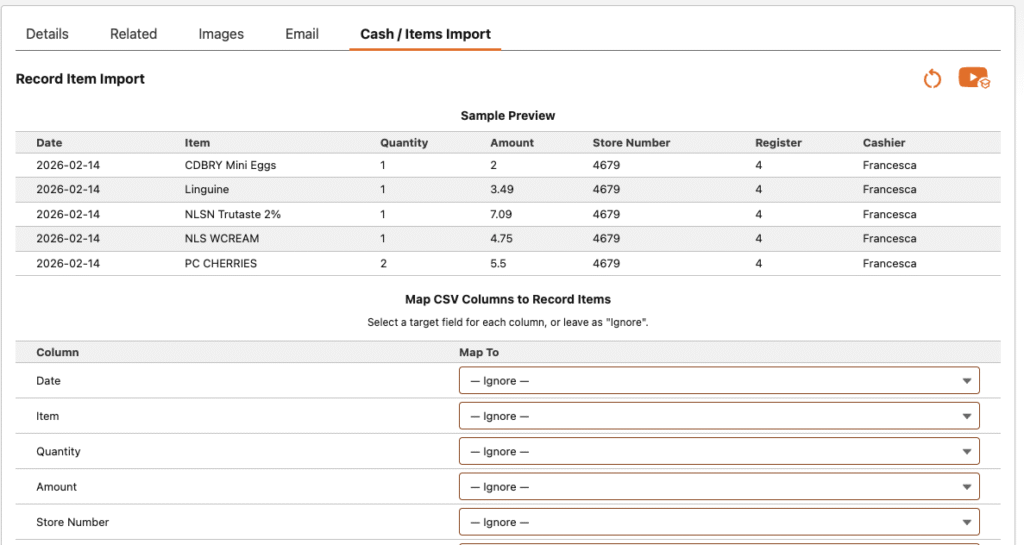
We’ve introduced a new Item / Cash Loss Import feature on the Record Entry page designed to streamline high-volume data entry. This component is ideal when you already have loss items prepared in a CSV file or exported from an existing syestem and need an efficient way to bring that information into the system. With flexible field mapping, you can quickly align your CSV data to the appropriate record fields, significantly reducing manual input time and improving accuracy. Beyond speed and convenience, this feature also reinforces the value of itemized entry. Capturing detailed, line-level data provides deeper visibility into which products are most frequently targeted, helping identify trends, quantify risk, and support more informed loss prevention strategies. By understanding exactly where losses occur, teams can better position training, merchandising, and protection efforts around high-loss items. As always, this feature is fully optional. If it doesn’t fit your workflow, it can be easily removed.
Check out this video on how this feature works.
Email Incidents directly from the Application
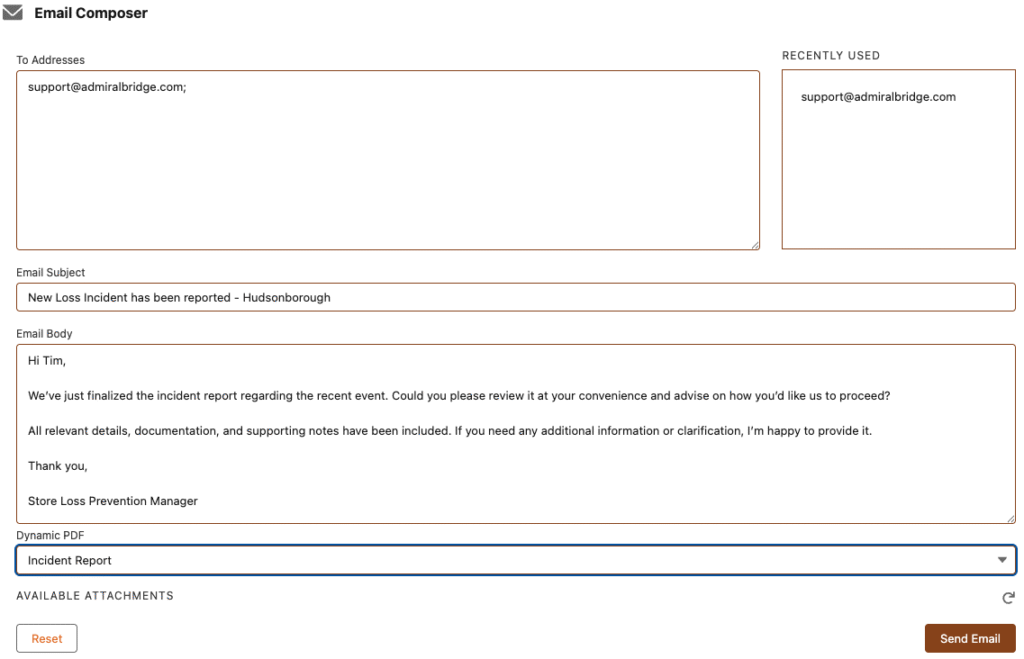
The Email Composer feature provides a streamlined way to draft and send communications directly from within a record. Users can create and send emails to any recipient without leaving the workflow, ensuring faster and more consistent follow-up. To support complete and professional correspondence, the composer allows you to select from any attachments already associated with the primary case record, eliminating the need to download and reattach files manually.
In addition, you can include a dynamic PDF generated in real time, containing the key details of the incident record. This ensures recipients receive accurate, up-to-date information presented in a clear, standardized format. Whether communicating with internal stakeholders, management, or external partners, this capability helps maintain documentation quality and consistency.
For improved traceability and compliance, every email sent through the composer is automatically logged as a task against the related record. This creates a reliable audit trail of communications and reduces the risk of missed or undocumented follow-up.
To enhance efficiency, the composer also features a Recently Used address list. As you send emails, the system remembers previously used recipients, allowing you to quickly resend messages without repeatedly entering email addresses. If your account includes your direct manager or delegated approver, their addresses will conveniently appear in this list as well, making routine reporting and escalation faster and easier.
Data Entry Form Admin Preview
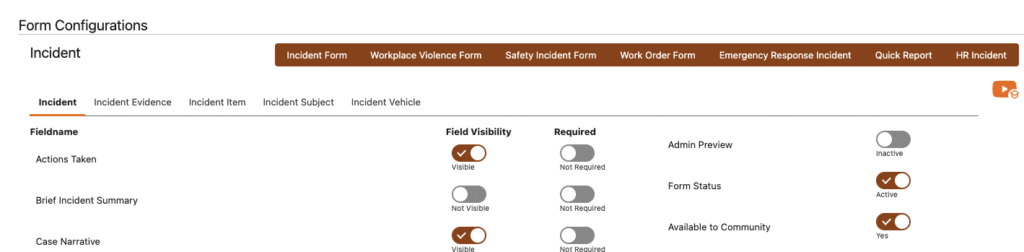
AdmiralBridge includes seven purpose-built forms, each developed through direct customer feedback and extensive industry research. These forms are packaged, configured, and ready for use at launch, enabling organizations to get up and running quickly without the need for custom development.
Recognizing that every customer’s processes and data requirements are different, each form is fully adaptable. Administrators can easily tailor the experience by toggling fields on or off, ensuring users see only the information relevant to their workflow. This flexibility allows teams to align AdmiralBridge with existing operational practices while maintaining a clean and efficient interface.
To further support a smooth rollout, we’re introducing the Admin Preview feature. This capability allows new or modified forms to be activated exclusively for the System Administrator team, providing a safe environment to validate configurations, confirm field visibility, and test end-to-end workflows before releasing changes to users. By enabling controlled testing and refinement, Admin Preview helps reduce deployment risk, prevent user disruption, and ensure confidence at launch.
Prompt Generation
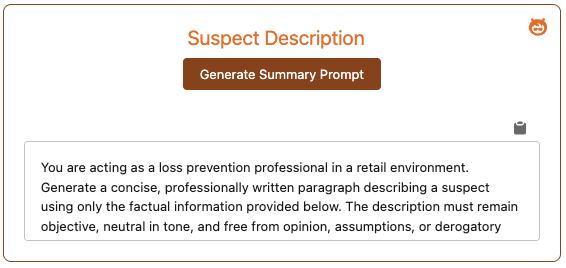
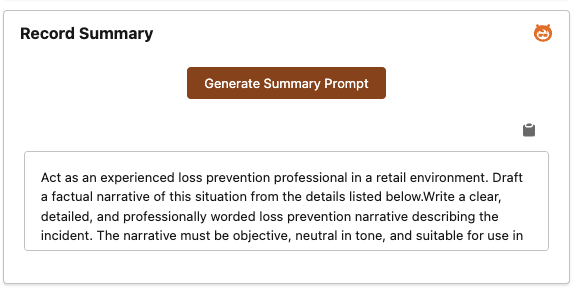
As part of our ongoing efforts to leverage AI and Large Language Models (LLMs) to better support our customers, we’re excited to release a new add-on feature designed to make incident reporting and analysis faster and more insightful.
With this feature, you’ll find the full record prompt conveniently available on the main Incident Summary page, while the suspect prompt is located directly on the suspect entry page. The workflow is simple: fill out all the relevant details for the incident record, including all associated items and information, then click the Prompt Generator. Once the prompt is generated, use the copy icon to easily transfer the data into your LLM of choice for analysis, summarization, or further AI-driven insights.
After reviewing the result of your LLM you can paste it into the Narrative field of your case record and it will be included in the final PDF report.
This capability allows teams to quickly translate structured incident data into actionable intelligence, helping with reporting, trend identification, or drafting narratives, all while maintaining control over the content and workflow.
Cash Over / Short
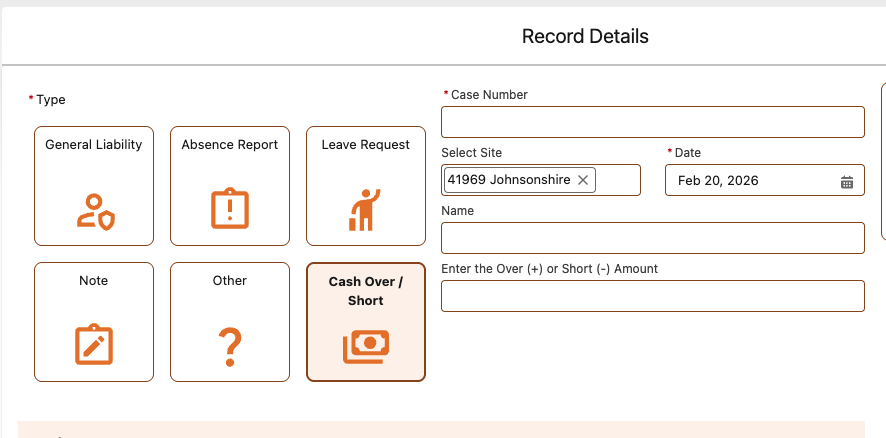
We’ve enhanced our Quick Report form to now include Cash Over / Short tracking. This update makes it easy to record overages and shortages directly as part of your routine reporting. By consistently capturing this data, teams can monitor trends over time, identify recurring patterns, and pinpoint potential areas of risk. Understanding where and when overages or shortages occur provides valuable insights for improving cash handling practices, strengthening internal controls, and supporting proactive loss prevention strategies.
Predefined Actions
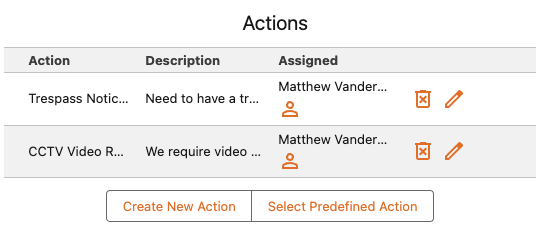
Follow-up actions can be created anywhere in the platform, helping ensure critical tasks never slip through the cracks. Whether you need to remind yourself to contact law enforcement or submit a CCTV request to another user, Actions keep work organized, visible, and accountable.
AdmiralBridge now introduces Predefined Actions, making this process even faster and more consistent.
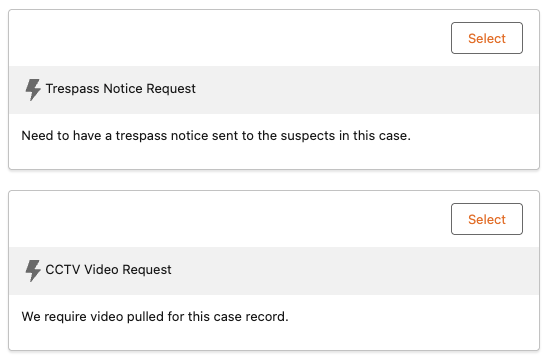
Administrators can configure Predefined Actions directly from the AdmiralBridge Admin page by selecting Predefined Actions from the left menu. Each action can be tied to a specific Object and Record Type, allowing precise control over where it appears. During setup, admins define a Title and Description, and may optionally specify a default due date (based on a set number of days from creation) and a default assignee.
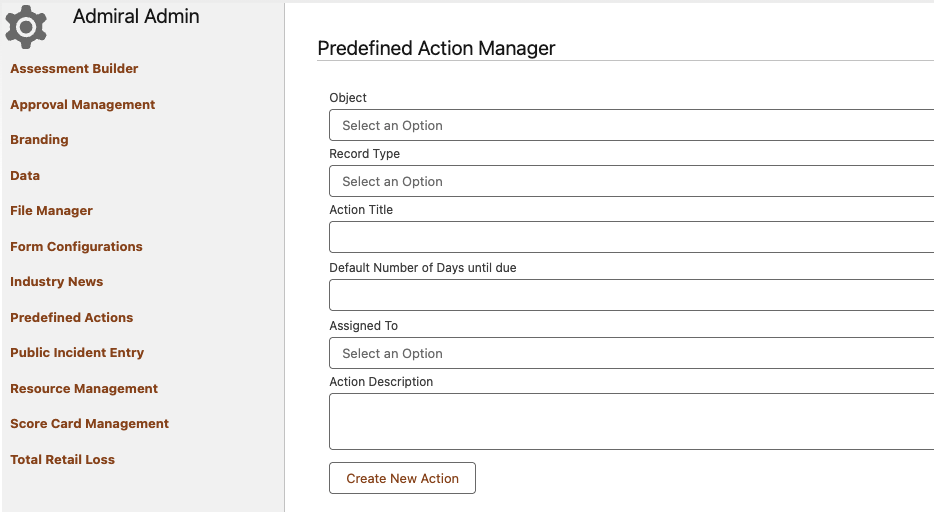
When users select a Predefined Action, these values are automatically populated, while still allowing edits before saving. If one or more Predefined Actions are configured for an Object and Record Type, users will see a Select a Predefined Action button while working on records, providing a streamlined and guided experience.
Conclusion
Together, these new features Item / Cash Loss Import, Email Composer, Configurable Forms with Admin Preview, AI Prompt Integration, Pre-defined Actions, and Cash Over / Short tracking, offer powerful tools to streamline workflows, improve data accuracy, and provide deeper insights into loss prevention activities. Each enhancement is designed to save time, reduce manual effort, and support smarter decision-making, while maintaining the flexibility to adapt to your team’s unique processes. By leveraging these capabilities, organizations can not only respond more effectively to incidents but also proactively identify trends, protect high-risk items, and strengthen overall operational controls.