
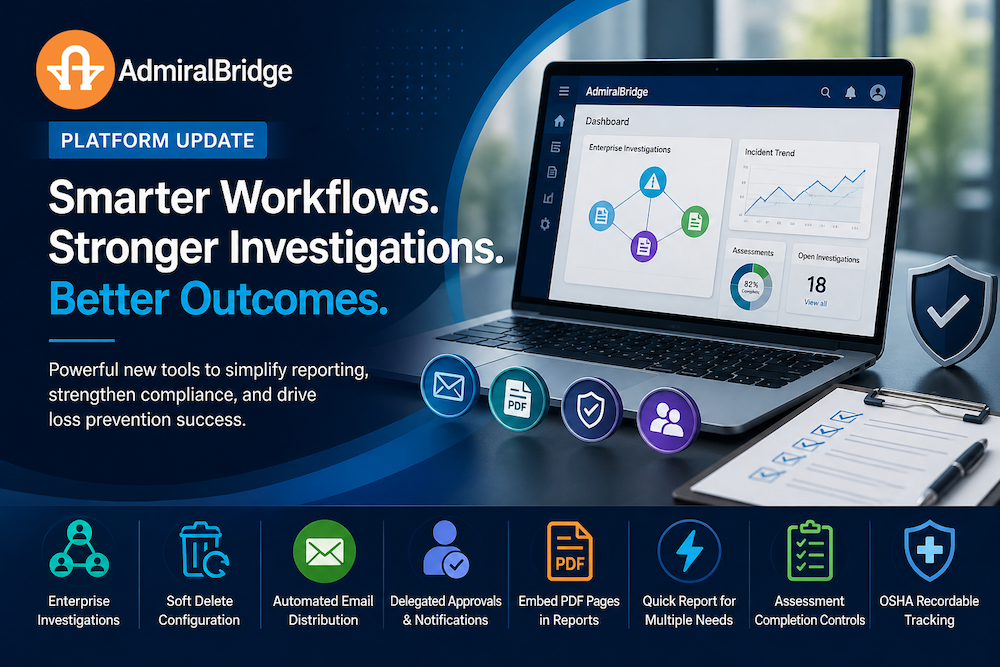
We’re continuing to evolve the AdmiralBridge platform to help organizations better manage risk, improve operational visibility, and strengthen end-to-end incident and compliance workflows. This latest set of enhancements focuses on unifying fragmented data, improving investigative capability, increasing automation, and reinforcing governance across safety, loss prevention, and operational reporting processes.
Together, these updates are designed to reduce manual effort, improve data quality, and ensure critical information flows seamlessly between frontline teams, management, and external stakeholders. Whether it is connecting related incidents, improving assessment completeness, or automating key communications, each feature is built to support faster decisions and more defensible outcomes in high-risk environments.
Enterprise Investigation
We’ve introduced a new Enterprise Investigation feature designed to strengthen case management and support complex, multi-incident investigations across your organization.
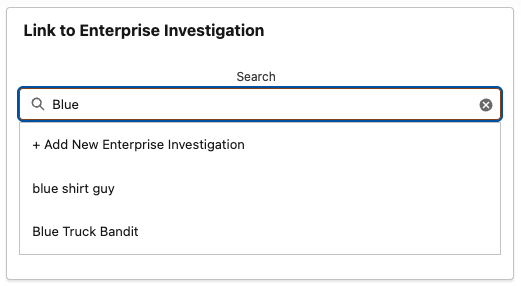
This capability enables authorized users to manually associate related Loss Incident Reports, Safety Reports, and HR Reports under a single Enterprise Investigation record. By consolidating these data points, organizations can identify patterns, link repeat incidents, and build actionable intelligence over time.
This feature was developed in response to real-world retail challenges, specifically our thrift store partners who experience organized donation door thefts where suspects are not immediately identifiable. For example, repeated incidents involving a common vehicle descriptor such as a “blue truck” can now be systematically tracked and aggregated. As additional details are obtained, such as a license plate, the investigation can be escalated with comprehensive supporting documentation for collaboration with law enforcement agencies.
The Enterprise Investigation framework supports a dual approach to incident management:
individual events can be closed efficiently at the store level, while simultaneously contributing to a broader investigative file. This ensures frontline teams maintain operational efficiency without compromising the integrity or continuity of larger investigations.
Key loss prevention benefits include improved pattern recognition, enhanced case linkage, better evidence consolidation, and stronger readiness for external enforcement engagement.
Soft Delete Configuration on Loss Incident Reports
We’ve introduced Soft Delete Configuration to enhance data governance, audit integrity, and operational control within your incident management process.
This feature allows users without formal delete permissions to remove records from their active view without permanently erasing them from the system. Instead of being fully deleted, these Loss Incident Reports are transitioned into a controlled “soft deleted” state, where they remain securely retained and accessible to authorized administrators.
From a loss prevention perspective, this approach addresses a critical balance between usability and evidentiary integrity. Frontline users often need the ability to clean up duplicate entries, test records, or prematurely created reports that do not meet reporting standards. However, unrestricted deletion introduces significant risk, including the potential loss of evidence, gaps in reporting, or the inability to reconstruct incident history during internal reviews or external investigations.
Soft Delete mitigates these risks by introducing a structured review layer. Administrators can audit all soft-deleted records, validate the reason for removal, and determine whether the record should be permanently deleted, restored, or retained as part of an ongoing investigation. This ensures that no potentially relevant incident data is lost without oversight.
Operationally, this feature improves data quality by reducing clutter in active queues while preserving a complete historical record behind the scenes. From a compliance and investigative standpoint, it strengthens defensibility by maintaining an auditable trail of user actions, supporting internal accountability and external scrutiny if required.
Key loss prevention advantages include improved data integrity, controlled record lifecycle management, reduced risk of accidental or intentional data loss, and stronger audit readiness for both internal case reviews and collaboration with law enforcement agencies.
Automatic Email Distribution of Assessment Reports
We’ve introduced automated email distribution for completed assessment reports to ensure timely communication, consistent oversight, and improved accountability across your organization.
With this feature, once an assessment is finalized, the system will automatically send the report to all recipients listed in the adbr__Email_Recipients__c field on the associated adbr__Record__c. This enables immediate visibility of assessment outcomes without requiring manual follow-up or intervention.
Recipient lists can be dynamically managed through configuration, allowing organizations to tailor distribution based on operational structure. For example, workflows can be implemented to automatically populate recipients based on the assessment location, ensuring that notifications are routed to the appropriate stakeholders such as the assessing employee, location management, district leadership, or loss prevention personnel.
From a loss prevention perspective, this automation strengthens response times and ensures that critical findings, compliance gaps, or risk indicators are escalated promptly. It also reduces the likelihood of communication breakdowns, ensuring that no key stakeholder is inadvertently excluded from the review process.
To maintain data security and confidentiality, organizations should ensure that recipient lists are restricted to authorized personnel and aligned with internal privacy and information-sharing policies.
If you’re interested in enabling this feature, connect with your Customer Success Manager to review configuration options and ensure alignment with your operational and compliance requirements.
Delegated Approval Settings and Automated Email Notifications
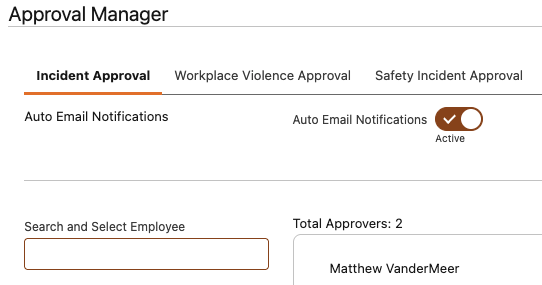
We’ve enhanced approval workflows by leveraging Salesforce’s delegated approver framework to improve oversight, accountability, and response efficiency within your organization.
As part of standard user configuration, the delegated approver field can be populated with the user’s direct manager or designated supervisor. When a record is submitted for approval, the system will automatically notify the delegated approver via email. This notification includes a PDF copy of the report, a direct link to the corresponding AdmiralBridge record, and clear approval instructions, enabling timely and informed decision-making.
From a loss prevention perspective, this ensures that approvals are consistently routed to the appropriate level of authority, reducing delays and strengthening managerial oversight of incidents, assessments, and investigations. It also creates a documented approval trail, supporting audit readiness and reinforcing internal controls.
In addition to automated notifications, we’ve expanded platform capabilities to allow Salesforce validation rules to be enforced within AdmiralBridge custom forms. This enhancement ensures that all required data fields, compliance checks, and business rules are satisfied before a record can be submitted for approval.
This dual-layer approach—combining structured approval routing with enforced data validation—helps prevent incomplete or inaccurate submissions, improves data quality, and reduces rework. It also ensures that decision-makers are reviewing complete, standardized information, which is critical for effective risk assessment and incident resolution.
Key loss prevention benefits include stronger approval governance, improved data integrity, enhanced accountability, and increased confidence in the accuracy and completeness of submitted reports.
Embed PDF Pages Within Record Reports
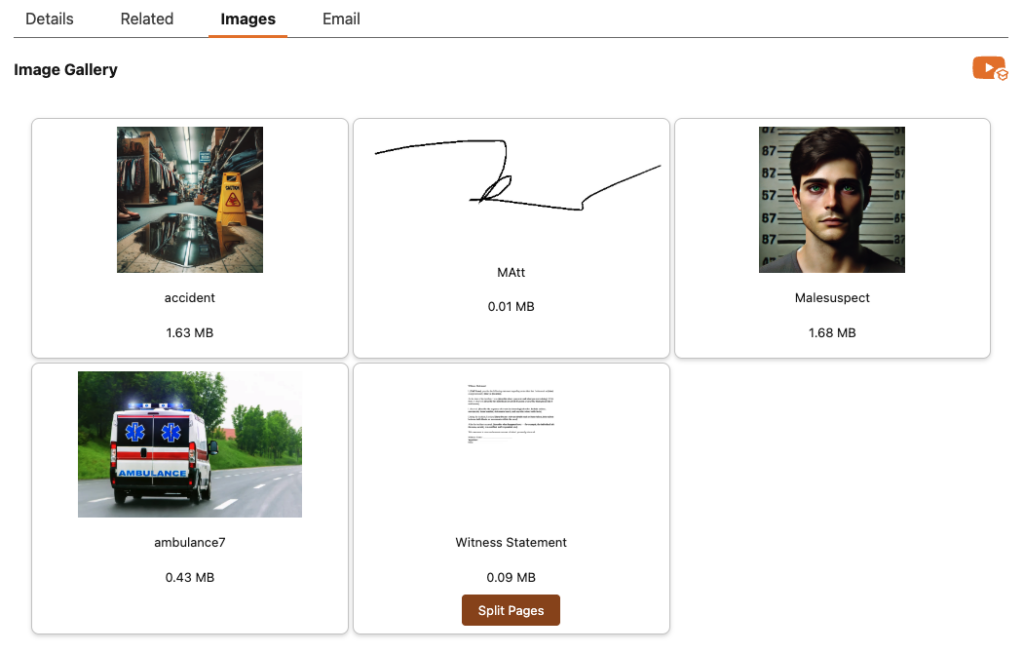
We’ve enhanced our Image Evidence and Image Gallery components to now support PDF document uploads, expanding the types of supporting documentation that can be included directly within your reporting workflows.
Users can now upload PDF files as part of their record documentation. By default, the system will automatically generate and display the first page of the PDF as a preview image within the final report, allowing reviewers to quickly identify and validate attached supporting materials without opening external files.
For records requiring full document visibility, the Image Gallery Split Document feature can be used to separate a multi-page PDF into multiple single-page PDF files. When processed in this format, each page will render individually within the final generated report, ensuring complete document visibility and improved readability for reviewers.
From a loss prevention and investigative standpoint, this enhancement strengthens evidence management by allowing organizations to embed supporting materials such as witness statements, invoices, case documentation, police reports, signed acknowledgements, or compliance records directly into the reporting package.
This reduces dependency on external attachments, improves report completeness, and ensures that all relevant documentation remains consolidated within a single investigative or operational record.
Key benefits include improved evidence presentation, stronger documentation integrity, enhanced audit readiness, and more efficient case review for internal stakeholders and external partners such as law enforcement agencies or insurers.
General Incident and Document Request to Quick Report
Our Quick Report form has evolved into a flexible, configurable solution designed to meet a wide range of operational and reporting needs across your organization.
Built as a streamlined data capture tool, the form is intentionally designed to collect only essential information, enabling frontline users to document events quickly and efficiently without unnecessary complexity. This supports timely reporting while reducing barriers to adoption and improving overall data consistency.
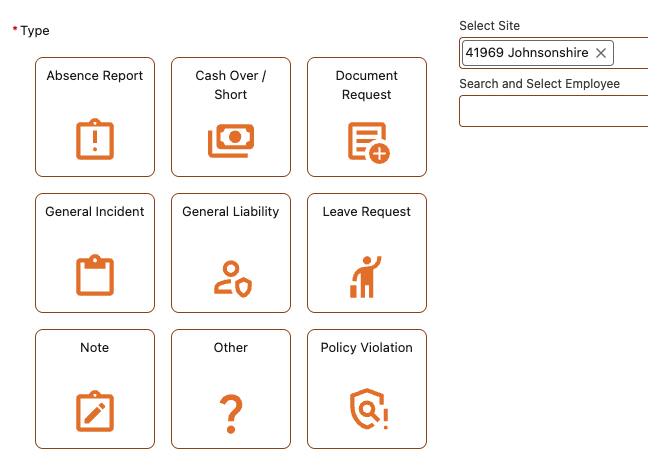
Recognizing that reporting requirements vary by organization and location, the Quick Report form is fully configurable. Administrators can enable or disable individual report types based on business needs, ensuring the form aligns with specific workflows, compliance requirements, and loss prevention priorities.
Currently, the form supports the following report types:
- Absence Report
- Cash Over / Short
- Document Request
- General Liability
- General Incident
- Leave Request
- Notes
- Policy Violation
From a loss prevention perspective, this flexibility allows organizations to standardize quick-entry reporting for common events such as cash discrepancies, policy violations, and general incidents, while still maintaining the ability to adapt to unique operational scenarios.
By simplifying the reporting process and tailoring available options, the Quick Report form helps improve reporting compliance, increase data accuracy, and ensure that critical events are captured consistently across all locations.
Unanswered Questions & Required Completion for Assessments
We’ve introduced new capabilities within the assessment workflow to improve data completeness, strengthen compliance, and support field teams in executing consistent, high-quality assessments.
Users can now filter assessments to display only unanswered questions, allowing them to quickly identify gaps and ensure all required information is captured before submission. This targeted view reduces oversight risk and improves efficiency, particularly in longer or more detailed assessments.

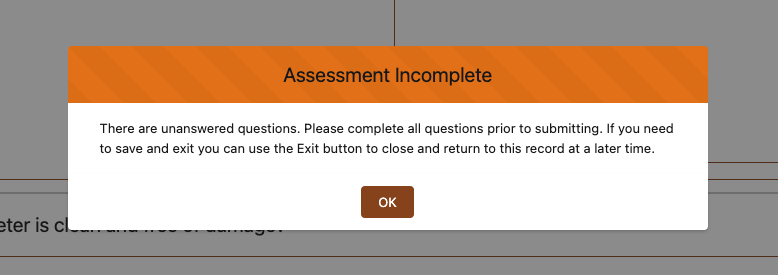
In addition, new configuration settings allow administrators to enforce full completion of all assessment questions prior to submission. When enabled, users attempting to submit an incomplete assessment will be notified that required fields remain outstanding. The system will then automatically direct them to the filtered view of unanswered questions, streamlining the correction process.
Importantly, users still retain the flexibility to exit an assessment at any time and return later to complete it. However, final submission will be restricted until all required data has been entered when this control is active.
From a loss prevention and compliance perspective, these enhancements help ensure that assessments are thorough, standardized, and defensible. Complete data capture supports more accurate risk identification, improves audit readiness, and reduces the likelihood of missed controls or incomplete documentation.
Key benefits include improved data integrity, stronger compliance enforcement, enhanced user guidance, and more reliable assessment outcomes across all locations.
OSHA Instructions & OSHA Recordable Flag
We’ve expanded our safety and workplace violence tracking capabilities to better support regulatory compliance and standardized incident classification.
This update introduces an OSHA Recordable field on both incident records and injured person records, enabling organizations to formally designate and track recordable events in alignment with Occupational Safety and Health Administration guidelines.
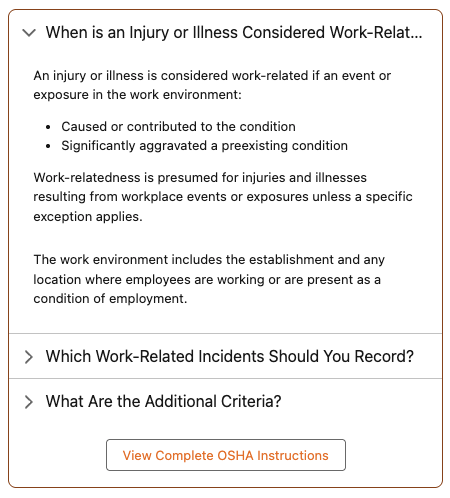
To support accurate classification, we’ve also embedded contextual guidance directly within the platform, including key OSHA criteria such as:
- When an injury or illness is considered work-related
- Which work-related injuries and illnesses must be recorded
- Additional recordability criteria and thresholds
Users also have access to a direct link to the full OSHA reference guide, ensuring that teams can quickly validate requirements and make informed decisions at the point of data entry.
From a loss prevention and risk management perspective, this enhancement helps standardize incident reporting, reduce classification errors, and strengthen defensibility during audits or regulatory reviews. It also supports better visibility into workplace safety trends, enabling organizations to proactively identify and address risk areas.
Activation is simple and fully configurable. Administrators can enable the OSHA Recordable field through the AdmiralBridge Admin settings on either the main safety form or the injured person form, depending on operational requirements.
Key benefits include improved regulatory compliance, more accurate incident classification, enhanced audit readiness, and stronger alignment with workplace safety standards.
Conclusion
These enhancements reflect a continued commitment to building a connected, intelligent, and audit-ready operational platform. By strengthening how data is captured, linked, validated, and distributed, organizations gain a clearer and more reliable view of incidents and risks across all locations.
From enterprise-level investigations to automated reporting and improved compliance controls, each feature contributes to a more structured and proactive approach to loss prevention and safety management. The result is not just better reporting, but stronger organizational awareness, faster response times, and improved defensibility in both internal reviews and external engagements.
If you would like to explore any of these features further or discuss how they can be tailored to your organization, your Customer Success Manager can help guide configuration and rollout options or contact us.