
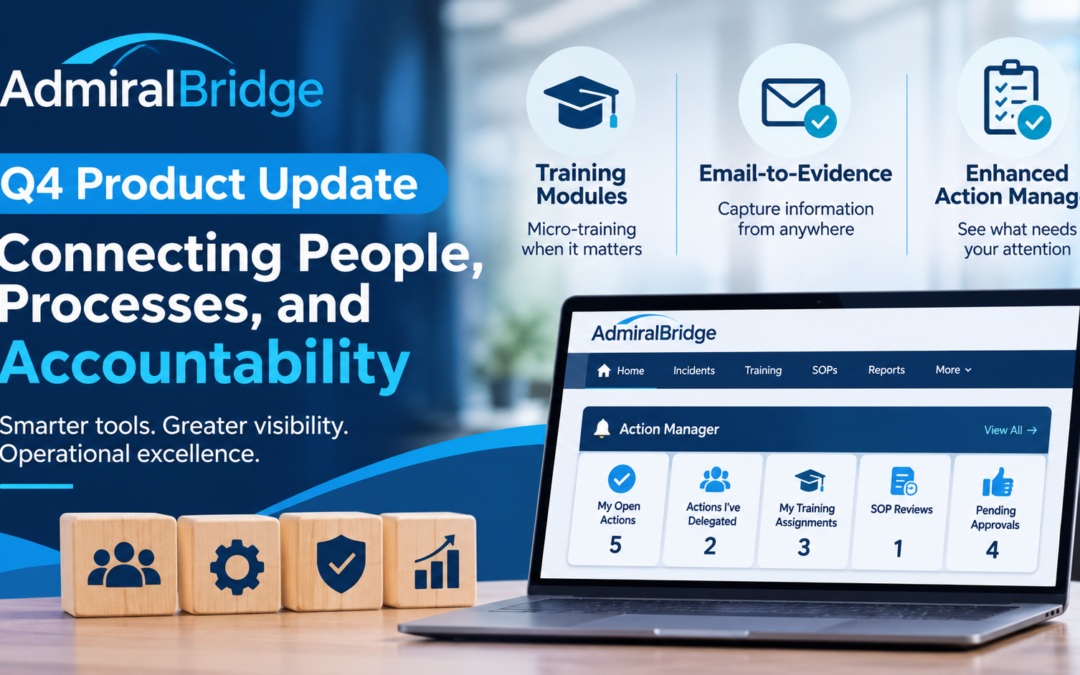
At AdmiralBridge, we believe powerful software doesn’t have to be complicated. The best technology helps people do their jobs more effectively, makes important information easier to access, and gives organizations greater confidence that the right things are getting done.
This quarter, we’ve introduced new ways to deliver employee training, simplified how information and supporting documentation enter an investigation, and expanded the Action Manager to give users a clearer picture of their outstanding responsibilities.
While each enhancement addresses a different part of your operation, they share a common purpose: helping organizations move beyond simply recording what happened and providing the tools to manage what happens next.
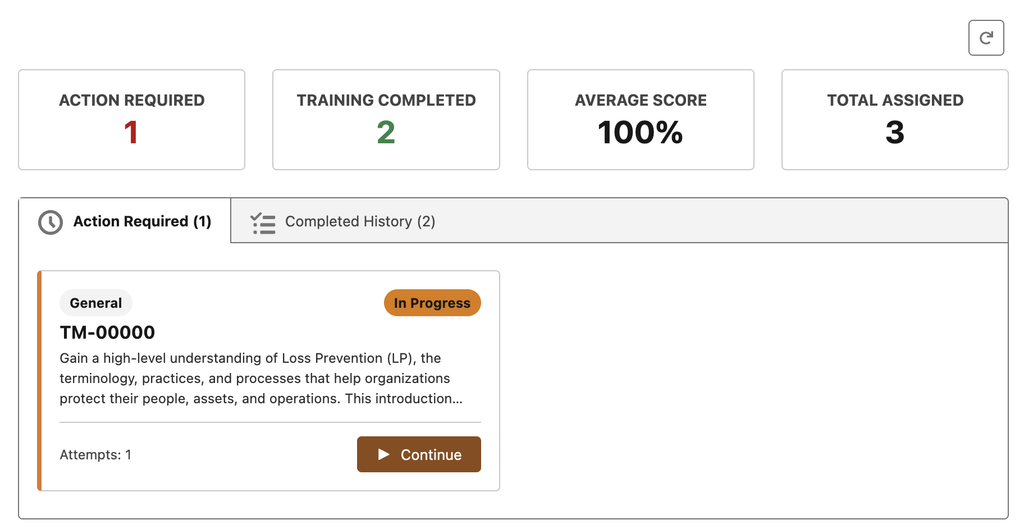
1. Introducing AdmiralBridge Training Modules: Micro-Training Where Your Team Needs It
Training doesn’t have to mean lengthy courses, complicated learning management systems, or pulling employees away from their daily responsibilities.
AdmiralBridge has introduced a new Training Module capability that allows administrators to build and deliver focused, interactive micro-training directly to users within the AdmiralBridge platform.
The goal is simple: put relevant information in front of employees when they need it, reinforce important procedures, and help organizations create a more consistent approach to operational training.
Practical Training for Everyday Operations
Training Modules can support a wide variety of operational and employee development needs:
- Loss Prevention: Teach employees how to recognize common theft indicators, identify suspicious behaviours, and properly document an incident.
- Workplace Safety: Reinforce procedures for responding to workplace injuries, emergencies, or potentially violent situations.
- Standard Operating Procedures: Walk employees through opening and closing procedures, cash handling requirements, or store security checks.
- Incident Reporting: Demonstrate what information should be included in an incident report and how to properly capture supporting evidence.
- Customer Service: Provide scenario-based training to help employees respond consistently to difficult customer interactions.
Rather than expecting employees to remember everything covered during an annual training session, organizations can deliver smaller, focused learning experiences that reinforce specific expectations and procedures.
Building Your First Training Module
Getting started is straightforward. Administrators responsible for creating training content will need the AdmiralTrainingAdmin permission set.
Once assigned, navigate to the Training Module tab.
Step 1: Create a Training Program
Select New to create a Training Program. This serves as the parent record for a training course and allows you to organize multiple versions of the same course over time.
For example, you might create a Training Program called “Store Incident Reporting.” As procedures evolve, you can maintain different versions of the course under the same program.
Provide a User Visible Title and User Visible Description. These are the details employees will see when accessing their available training.
Step 2: Build Your Training Content
Once your Training Program has been created, navigate to the Training Builder tab to begin developing your course.
The Training Builder allows you to organize content into sections and create different types of learning screens.
Use the + button to add a new section. Use the +v button to add individual content screens, including:
- Text Screen: Present instructions, explanations, or important information.
- Video Screen: Incorporate video content to demonstrate a process or procedure.
- Image Screen: Display visual instructions, diagrams, or step-by-step guidance.
- Question Screen: Test understanding through interactive questions and answer choices.
You can combine these screen types to create a training experience that is informative, engaging, and easy to follow.
Step 3: Make Your Training Visually Engaging
One of the easiest ways to create visually appealing training content is to use PowerPoint. Build your slides using familiar presentation tools, then export each slide as an image. You can upload those images into a series of Image Screens within your training module. This approach gives administrators considerable flexibility to create polished training materials without needing graphic design skills or specialized content development software.
For example, a course on store opening procedures could use a series of illustrated slides covering:
- Disarming the store alarm.
- Inspecting entrances and exits.
- Completing the opening security assessment.
- Documenting and escalating any concerns.
Each screen provides a clear visual reference for the employee to follow.
Step 4: Reinforce Learning with Questions and Scenarios
Training is most effective when employees have an opportunity to demonstrate what they have learned. Question Screens allow administrators to introduce a scenario in the screen content and then present a question using the Question Prompt.
For example:
Scenario: You are completing your evening store closing procedures when you notice that a rear emergency exit has been left unsecured.
Question: What should you do next?
You can configure multiple response options, identify the correct answer, and provide explanations for why each response is correct or incorrect. This goes beyond asking employees to memorize procedures. It allows organizations to introduce realistic situations and reinforce the decisions employees are expected to make. Providing explanations for incorrect answers is equally important. It helps employees understand not just what the right answer is, but why the procedure matters.
Why This Matters to Your Organization
Training is only valuable when employees can apply what they have learned. Traditional training approaches often involve lengthy sessions, separate learning platforms, or static documents that employees may rarely revisit. AdmiralBridge Training Modules provide another option: short, focused learning experiences developed around the actual operational needs of your organization.
For administrators, this means greater control over training content and the ability to update materials as procedures change.
For managers, it provides an opportunity to reinforce expectations and introduce consistent training across multiple locations.
For employees, it means receiving relevant information in manageable segments, with practical examples that relate directly to their day-to-day responsibilities.
Micro-learning is more than simply making training shorter. Research has demonstrated its potential to improve knowledge retention, engagement, and the practical application of learning. A recent systematic review examining 40 studies explores these benefits in greater detail.”
Read more about the research behind micro-learning
Better-trained employees. More consistent procedures. Greater operational confidence.
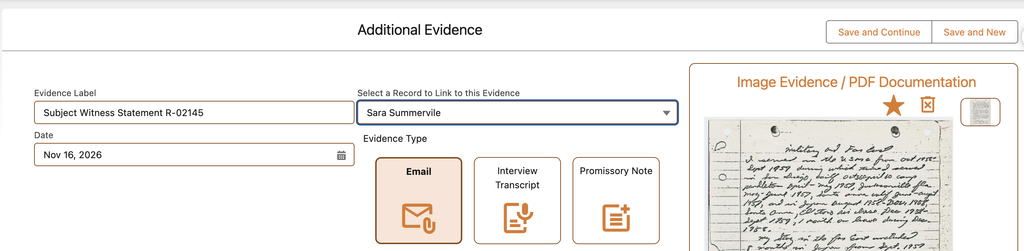
2. New: Email-to-Evidence and Documentation in AdmiralBridge
Getting information into an investigation should be simple, even when your team isn’t logged into AdmiralBridge.
We’ve introduced a new packaged email service that makes it possible to submit supporting documentation, files, and other information directly into AdmiralBridge using email.
This provides another convenient way for your team to capture and organize information without having to manually navigate to a record and upload each document.
The feature uses Salesforce Email Services and our new packaged Apex email handler, EmailHandlerGeneral, to process incoming messages and create the appropriate records within AdmiralBridge.
Turn an Email into Investigation Evidence
Consider a situation where an investigator receives photographs, a PDF, or other supporting documentation from a store manager. The investigator knows which case the information belongs to but may not currently be logged into AdmiralBridge.
Instead of saving the attachments and uploading them manually, they can simply send an email to the designated AdmiralBridge email service address.
Here’s how it works:
- Include the AdmiralBridge case number in the email subject line (for example, R-123).
- Attach the documents, photographs, or other supporting files.
- Send the email to the configured AdmiralBridge email address.
AdmiralBridge will process the incoming email and automatically create an Evidence record associated with the identified case.
The email attachments become files associated with the new Evidence record, and the body of the email is captured in the Record any additional notes section of the evidence entry. Each email creates a separate Evidence record, so if your team has multiple pieces of evidence to submit, they should send one email for each evidence entry. Once the Evidence record has been created, the investigator can open the case in AdmiralBridge and complete any additional relationship assignments, such as linking the evidence to the appropriate suspect or other related record.
More Than Just Investigation Evidence
Depending on the type of record being processed, incoming emails can be used to:
- Investigation Evidence: Create Evidence records and associate file attachments with an existing investigation.
- Safety Documentation: Process text attachments associated with Safety records.
- HR Documentation: Create Documentation entries associated with HR records.
This provides a consistent way for employees and investigators to submit information from their existing email workflows without requiring every user to have immediate access to the AdmiralBridge application.
Why This Matters
Investigations rarely happen entirely within one application. Information arrives through email, employees share photographs and documents, managers send reports, and investigators collect supporting information from multiple sources. Every additional step required to get that information into your case management system creates an opportunity for something to be missed or delayed. By allowing users to submit information through email, AdmiralBridge helps reduce administrative effort, makes evidence collection more convenient, and helps ensure that supporting documentation finds its way into the appropriate record.
For organizations with multiple locations and distributed investigation teams, this can be a particularly valuable time-saver.
Capture the information where it arrives. Get it into the right record. Keep your investigations moving.
Getting Started
The email service requires a one-time configuration within your Salesforce environment. For most customers, the AdmiralBridge team can help configure the email service and provide the appropriate inbound email address. For organizations with experienced Salesforce administrators, the packaged EmailHandlerGeneral Apex class can also be configured directly within Salesforce Setup. Instructions for completing this configuration are included below.
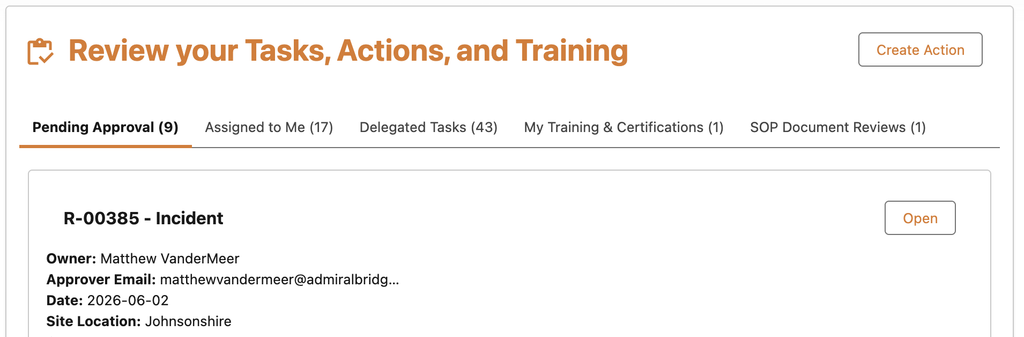
3. Enhanced Action Manager: Everything That Needs Your Attention, in One Place
Your AdmiralBridge homepage just became a lot more useful. We’ve expanded the Action Manager home page component to provide users with a consolidated view of their outstanding responsibilities across the AdmiralBridge platform. Rather than navigating between different tabs and modules to figure out what needs to be done, users can now see their outstanding work in one convenient location.
The enhanced Action Manager brings together several important activities:
- My Open Actions: See all outstanding actions assigned directly to you. Whether it is following up on an incident, completing a safety assessment, investigating an issue, or addressing an operational concern, your assigned responsibilities are visible from the homepage.
- Actions I’ve Delegated: Keep track of outstanding actions you have assigned to other users. Delegating work doesn’t mean losing visibility. You can quickly identify what remains outstanding and follow up when necessary.
- My Training Assignments: See the training modules that have been assigned to you and require your attention. This makes it easier for employees to stay current with organizational training requirements and helps ensure important learning activities don’t get overlooked.
- SOP Reviews: View the Standard Operating Procedure documentation you have been assigned to review. Whether you are reviewing a newly introduced procedure or validating an existing policy, your outstanding review responsibilities are readily accessible.
- Pending Approvals: If there are records waiting for your approval, they will also appear within the Action Manager. This provides managers and administrators with better visibility into decisions that may otherwise delay an investigation, operational process, or other business activity.
Why This Matters
As organizations grow, keeping track of responsibilities becomes increasingly difficult. Actions are assigned, training is distributed, procedures require review, and approvals need to happen. When these activities are spread across different parts of a system, it becomes easy for something to get missed.
The enhanced Action Manager helps address this challenge by bringing these responsibilities together into a single, centralized view.
For employees, it provides clarity about what they need to accomplish.
For managers, it provides visibility into the work they have delegated and helps them identify outstanding responsibilities.
For administrators, it creates a more consistent approach to managing training, SOP reviews, and approval processes across the organization.
Most importantly, it helps turn AdmiralBridge into more than a system for recording what happened. It becomes a tool for helping your organization manage what needs to happen next.
Less time searching for outstanding work. Greater accountability. A clearer picture of what needs your attention.
Continuing to Build Toward Operational Excellence
These Q4 enhancements represent more than a collection of new features. They reflect the direction we continue to take with AdmiralBridge. We want to help organizations create an environment where employees understand what is expected of them, important information is captured and accessible, procedures are consistently followed, and outstanding responsibilities don’t get lost along the way.
Training Modules help develop knowledge and reinforce expectations. Email-to-Evidence makes it easier to capture the information organizations need to make informed decisions. The enhanced Action Manager helps ensure that responsibilities, reviews, and approvals receive the attention they deserve. Together, these capabilities help connect the different activities that keep an organization running effectively.
Our vision for AdmiralBridge continues to evolve beyond traditional loss prevention and case management. We are building a practical operational excellence platform that brings people, processes, documentation, and accountability together in one place, and we’re doing it without losing sight of what matters most: software that is powerful enough to solve real business problems, but simple enough for people to actually use.
You don’t need another complicated platform. You need clarity, consistency, and the tools to get things done.
That’s what we’re building at AdmiralBridge.
If you missed our previous feature updates please check out